The ID HTTP Parameter is required (the ID of the list item to be edited)
When placing a qListView and qListForm on the same ASPX page you encounter an error in the qListForm when you select one of the folders from the document library that is configured in the qListView.
The error displayed in the qListForm is:
“The following error occurred: The ID HTTP parameter is required (the ID of the list item to be edited)”
The next prev buttons do not work in qListView
When using the display option for Next Previous buttons in a qListView the pages change but the data does not.
qListView/qChartView only display x amount of records (not caused by SP List View threshold)
When using qListView/qChartView only x amount of records are showing. Even when the SharePoint List Threshold is set higher than the amount of items in the list.
Issue with Lookup Column allowing Multi Values
In a qListForm, there are lookups that allows multivalues. The values in the lookup field gets populated based on the value selected in another drop down. If you select any value in lookup field and then again go back to change the values in the drop down, after postback, you get an index out of bound error.
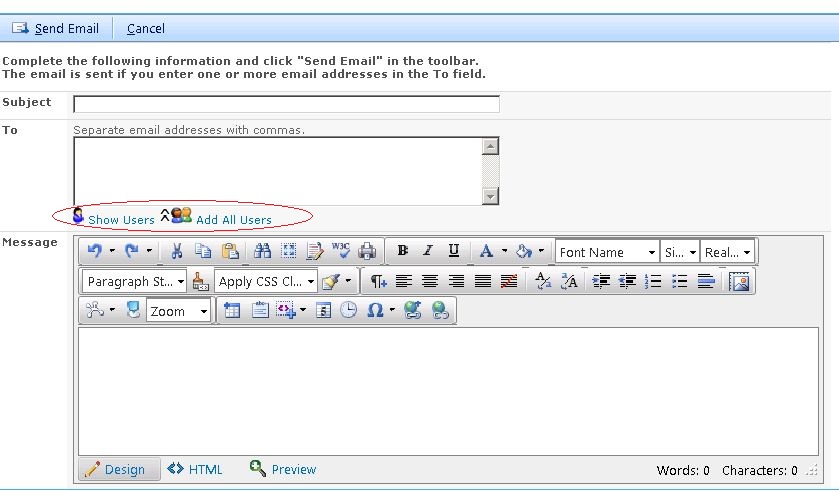
Does QuickApps for SharePoint have People Picker function in the Send Email Option for the “To:”?
Does QuickApps for SharePoint have People Picker function in the Send Email Option for the “To:”?
‘SetMouseOverRowIndex’ is undefined
Upgrading to QuickApps v6.2, we are getting the following two browser errors that prohibit the use of ezEdit and to expand a grouped item in qListView:
– ‘SetMouseOverRowIndex’ is undefined
– ‘null’ is null or not an object
The following error occurs: An error occurred while parsing EntityName. Line #, position ###.
We are getting error as The following error occurs: An error occurred while parsing EntityName. Line #, position ###. When using the Sort Fields in the QListView On Page Refresh error goes away and we can see data without the error.
Does QuickApps for SharePoint support Microsoft SharePoint 2013 workflow?
Does QuickApps for SharePoint support Microsoft SharePoint 2013 workflow?
qCascadingMenu Overlaps other Web Parts
When invoking the qCascading menu, the menu overlaps other Quick App Web Parts on the page if they are directly below the qCascadingMenu.
Exporting an entire list to Excel from qListView?
Working with a list with over 11k items configured in qListView, Since the Default view of the WebPart is set to 50 items per page, when we export to Excel, it only exports the items from the currently loaded page (not from the entire list).
Also, the exporting process takes approx 1.5 minutes. However, when exporting directly from SharePoint list, entire list (11K records) takes approx 20 seconds.
