Missing Menus in the ribbon when edit document with qListForm web part:
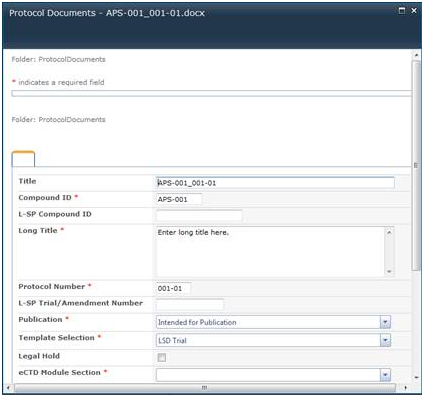

Missing Menus in the ribbon when edit document with qListForm web part:
Management Pages are missing in Central Administration so, I’m unable to update license.
The ‘Connect to Outlook’ button doesn’t seem to be functioning. Nothing happens when it is clicked
Unable activate Quest Web Parts feature in Site Settings. Seeing the follwoing error in ULS logs:
Feature receiver assembly ‘QuestWebPartsFeature, Version=1.0.0.0, Culture=neutral, PublicKeyToken=2b4b09f1c57c8f0b’, class ‘Quest.WebParts.Feature.FeatureReceiver’, method ‘FeatureActivated’ for feature ‘11730bed-af16-4fd0-985b-3ffa4792928f’ threw an exception: System.TypeInitializationException: The type initializer for ‘Quest.WebParts.Feature.FeatureLogger’ threw an exception. —> System.Security.SecurityException: Requested registry access is not allowed. at Microsoft.Win32.RegistryKey.OpenSubKey(String name, Boolean writable) at System.Diagnostics.EventLog.GetEventLogRegKey(String machine, Boolean writable) at System.Diagnostics.EventLog.Delete(String logName, String machineName) at Quest.WebParts.Feature.FeatureLogger..cctor() The Zone of the assembly that failed was: MyComputer — End of inner exception stack trace — at Quest.WebParts.Feature.FeatureLogger.Error(String message) at Quest.WebParts.Feature.FeatureReceiver.FeatureActivated(SPFeatureReceiverProperties properties) at Microsoft.SharePoint.SPFeature.DoActivationCallout(Boolean fActivate, Boolean fForce) fffc4665-415f-4b83-a7bd-33ecc976d545
Unable to create a site based on the Records Center template. The following error is written to ULS logs on SharePoint application server: “Failed to find the XML file at location ’12\Template\Features\QuestAdmin\Feature.xml'”
After creating a new item in any Discussion list via qListForm an extra version is added. This happens only when creating an item that contains Enhanced Richtext field.
The Custom Action capability enables you to write a custom code that can be called from qListView, qListForm, qSIListView or qSIListForm Web Parts. In your custom code, you can virtually do anything you want with the data. For example:
• You can write a complex custom validation and abort the action if the data is invalid.
• You can copy the item to another list or library before the item is saved in a qListForm.
• You can initialize one or more fields in the qListForm when the list form is initialized. Please see the Form Initialization Actions property of the qListForm and qSIListForm on how to call this kind of custom action. Please also see the code example below on how to write a custom action to initialize the list form.
I have a list with two Choice fields – Modula and Section (checkboxes)
I’ve created Calculated filed in qListForm web part that has the following formula: <%Section%><%Module%>
As a result I see the following in the calculated field ;#Section 1;#;#Module 1;#
Is there
When switching the language in Sharepoint 2010, the webpart culture (Resource List) does not applied accordingly.
Example:
1. add Culture=zh-CN in the page request URL. SP will present the web part page in zh-CN locale. Quest web part will decode the resource according to its resource list in zh-CN
2. switch the display language to English.
The webpart culture will still set as zh-CN
If you group a column that has a space at end of it within the qListView webpart then this crashes that page that webpart is on